iMovements
iMovements — Eye Movement & Neuro‑Ophthalmology App
A medically reviewed, educational app for patients, clinicians, and educators. iMovements explains eye movements, nystagmus, and neuroophthalmology with clear visuals and clinical context. It is built to support understanding, documentation, and teaching not to replace professional judgment.
Dr Ed Hauptman MBBS(Melb) FRANZCO FRCS Eye Surgeon & Medical Author
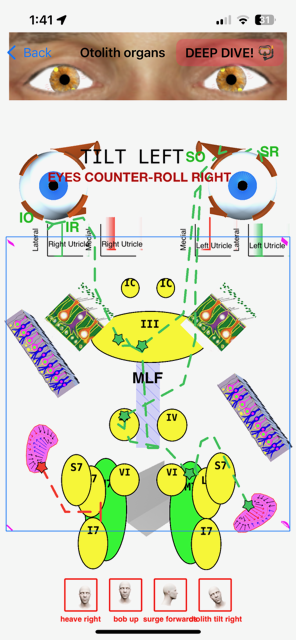
Validated clinical explanations for ocular motility, nystagmus, and neuro‑ophthalmology — written by a medical author.
Clinical purpose
iMovements supports teaching and documentation of eye movement disorders. It provides structured explanations and illustrations to aid discussion with patients and trainees. It is an educational tool and does not diagnose, treat, or replace clinical judgment.
Key Features
iMovements uses a high-precision SVG diagram engine to display crisp, scalable medical illustrations with interactive labels, layer toggles, and scripted animations. Built for eye‑movement teaching and clinical explanation, it lets you highlight structures, simplify views for patient discussions, or switch to an annotated mode for clinician and trainee learning.
iMovements features (at a glance)
\n
• Interactive SVG-based anatomy and pathway diagrams
\n
• Precise, scalable graphics that stay sharp at any zoom level
\n
• Layer-based visibility controls (turn structures/labels on and off)
\n
• Step-by-step animations for eye movements and clinical scenarios
\n
• Text labels and callouts integrated into diagrams
\n
• Works smoothly on iPhone and iPad with touch-first controls
\n
• Built for teaching, patient explanation, and clinician reference
Detailed features
\n
SVG diagram engine
\n
• Loads clinical diagrams as SVG so visuals remain crisp and readable at any magnification
\n
• Supports complex labelled diagrams with consistent layout and alignment
\n
• Reliable rendering of paths, shapes, and text for medical illustrations
\n
Interactive controls
\n
• Tap-to-highlight structures and regions
\n
• Toggle layers (show/hide labels, membranes, pathways, or groups of structures)
\n
• Clean view for patients; richer annotated view for clinicians
\n
Animation & teaching mode
\n
• Plays scripted animations that demonstrate movements and mechanisms
\n
• Step-based sequences suitable for teaching (pause, advance, repeat)
\n
• For rapid chair-side explanation or structured education
\n
Clinical authoring workflow
\n
• Efficient updates: revise diagrams and labels without redesigning the entire app
\n
• Consistent naming/label conventions to keep teaching content organized
\n
Practical use cases
\n
• Patient education: simple visuals for muscles, nerves, and pathways
\n
• Clinician reference: quick visual recall of anatomy and movement patterns
\n
• Teaching: structured sequences for trainees and presentations
Trust & compliance
• Built for education and clinical communication; not a diagnostic tool.
• Includes a clear contact pathway for feedback and support.

You will find the latest information about our company here. You will find...

You will find the latest information about our company here. You will find...

Dr Ed Hauptman
App Author
CEO of Berwick EyeCentre
Cataract Surgeon and
Neuro-Ophthalmologist
